Get everyone on the same page

Know what's happening without chasing people or waiting for the next meeting.

On-SamePage brings together the information scattered across your organisation and puts it in front of the people who need it — clearly, in context, and at a glance.

See what's happening. Understand what matters. Drill down when you need to.

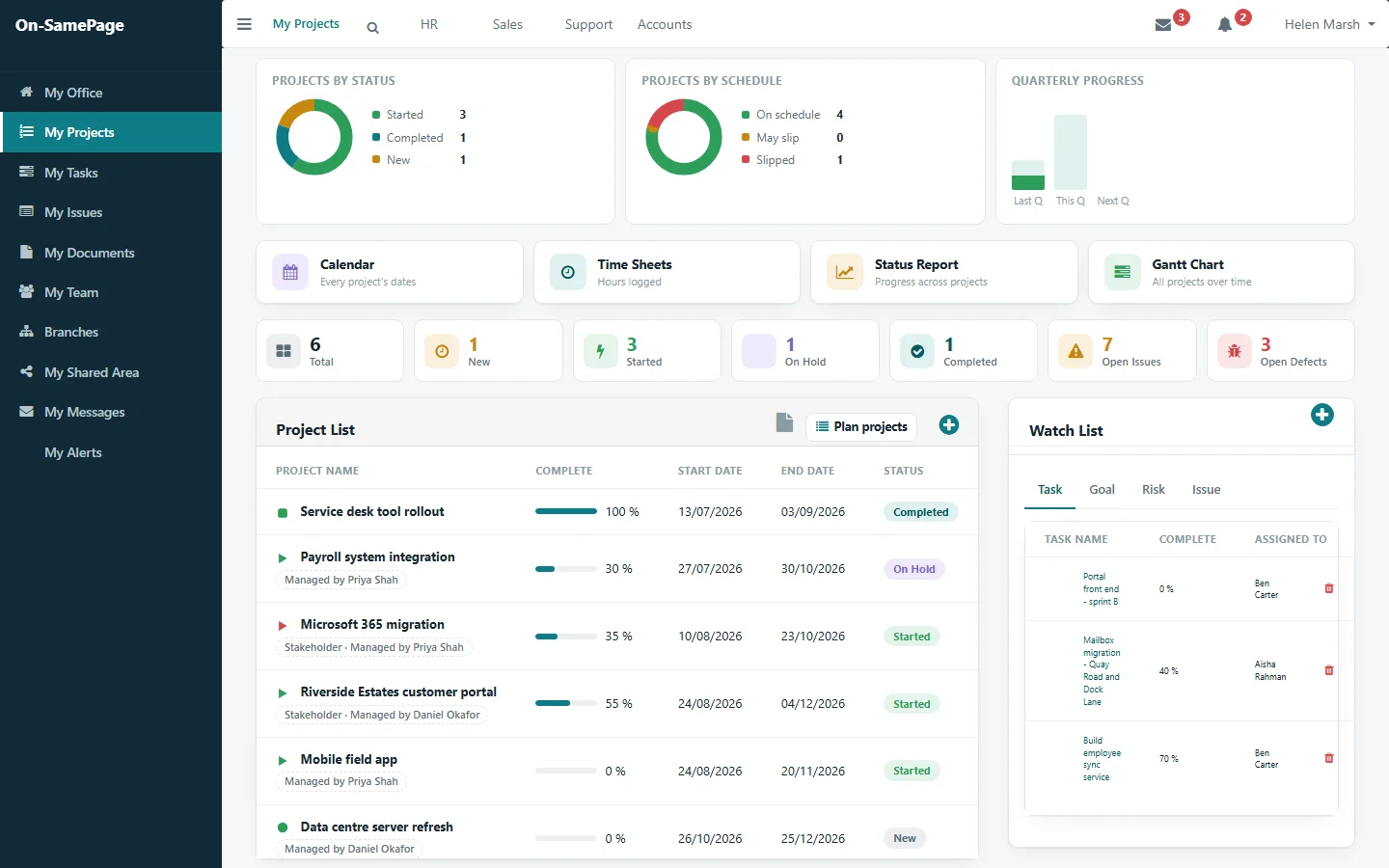
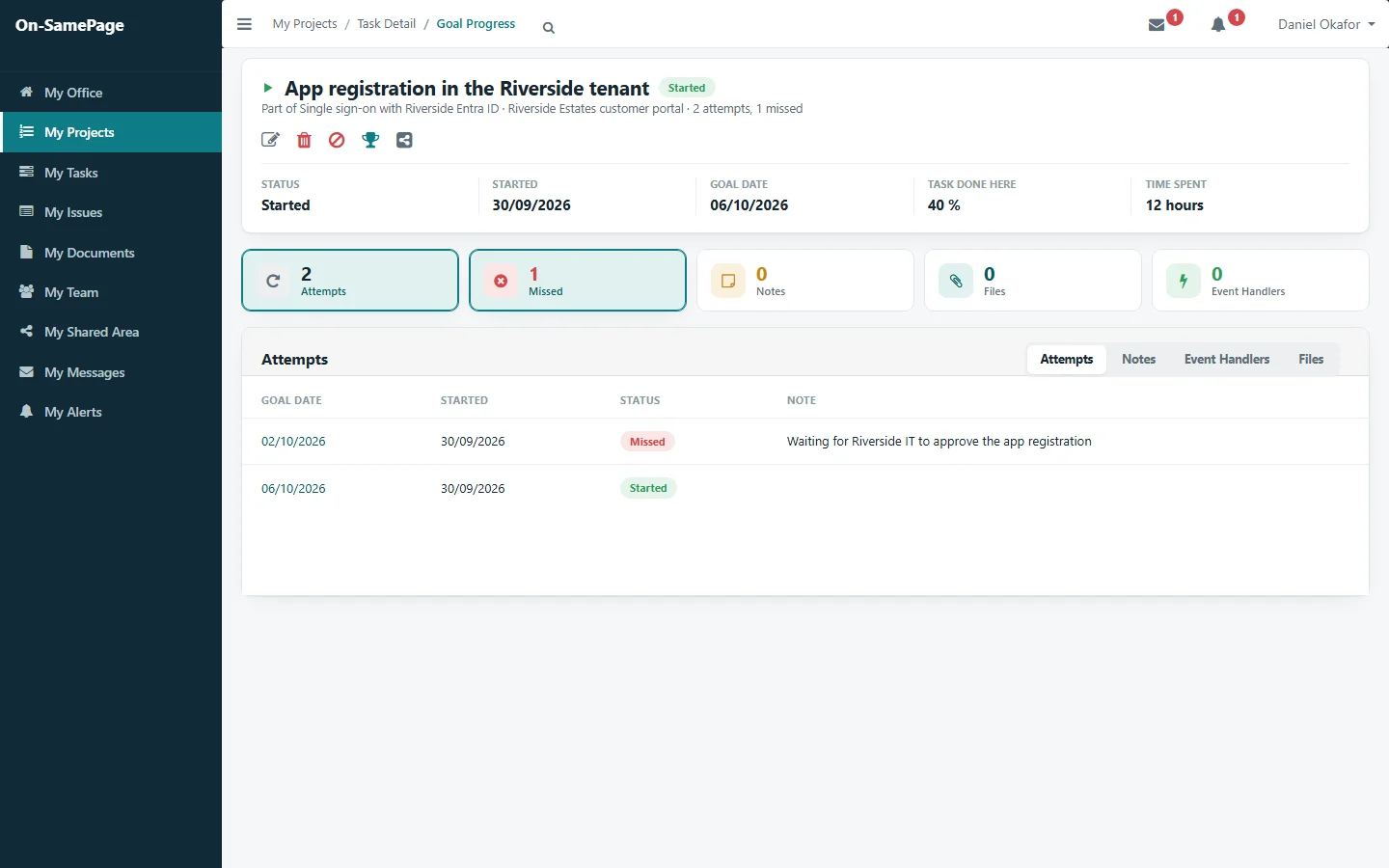
The overall picture: every project by status and schedule, with open issues and defectsWhat needs attention: a project where work has slipped, picked out in redThe detail: the step that was missed, the reason given and its new date
  1. Overall picture
  2. What needs attention
  3. The detail
Shown: one implementation of On-SamePage, for project-based services

Why it matters

1

Every organisation wants to deliver for its customers, meet its commitments and build a reputation for doing things well.

Giving customers what they need, when they need it, and the way they expect. When customers have a great experience, they come back. They recommend you to others.

2

The problem isn't a lack of information. It's knowing what is happening.

As organisations grow, the information needed to manage them spreads across emails, documents, spreadsheets, systems, reports and people's knowledge. Managers spend too much time finding out what is happening instead of deciding what needs to happen next, and by the time it has been collected, the situation may already have changed.

3

Businesses employ good people with the skills and experience to deliver for their customers.

But those people need the right information and tools to do their jobs effectively.

This is where On-SamePage can help.

Give people the information they need. Give managers the visibility they need to manage proactively.

Benefits

What organisations and their people gain

When people spend less time looking for information, sitting in status meetings and compiling updates, they have more time for the work that matters. Managers spend less time gathering information and more time making decisions. And when problems become visible earlier, they can act before they grow.

  1. Current information
  2. Less time chasing, reporting and in meetings
  3. More productive time, without overstretched people
  4. More capacity, lower overheads, room on price and margin

For your people

Fewer meetings. More productive time.

When everyone can see the current picture, meetings no longer have to be spent explaining what has already happened. They can be shorter, less frequent and focused on what needs to happen next. People have the time to get their work done without staying late or taking it home, which makes for a more contented team.

New team members up to speed, fast.

Someone joining mid-project, or taking over from a colleague, can see what has happened, where things are heading and who to go to for what. Questions and answers are kept on the project, so the next person doesn't have to ask again. Less of their time, and the team's, goes on bringing them up to speed.

Knowledge that stays with you.

What people know about the work is recorded as they do it, not kept in notebooks, inboxes or memories. It stays with the organisation when people are away or move on.

Every project document, to hand.

Team members have all the documents for their projects in one place, always at the current version, without searching through a maze of shared folders or asking someone else to find them.

For your organisation

Capacity, without stretching your team.

Time recovered from reporting, chasing and unnecessary meetings frees capacity in your existing teams, without anyone working longer hours. That can mean taking on more work without adding people at the same rate, and relying less on contractors where that makes sense.

Problems seen earlier. Decisions made sooner.

Managers can see where attention is needed before small problems become larger ones, so they act sooner and spend their time on decisions rather than gathering information.

Customers who come back.

Customers don't want to chase for updates. When they can see progress, what's coming next and anything that needs their attention, your team doesn't spend its time providing updates, and the trust it builds helps bring repeat work and recommendations.

Lower delivery overheads. Greater commercial flexibility.

Better use of existing capacity can reduce the overhead of delivering projects and services, giving the organisation more flexibility on price, margin and how much work it can take on.

How it works

From everyday work to the bigger picture

On-SamePage connects the information generated through everyday work, so everyone can see what matters to them, while managers can see the bigger picture and know where attention is needed.

  1. 1

    Do the work

    People record what they do as part of their normal work, through simple forms built around their role and your processes: tasks completed, milestones reached, time logged, issues raised, progress reported. Information doesn't need to be re-entered just so others can use it.

  2. 2

    See the picture

    Everyone sees the information relevant to their role and responsibilities. Managers see the bigger picture across their teams and areas of responsibility, without having to collect it from different people.

  3. 3

    Understand what matters

    Managers can see how work is progressing, recognise where attention may be needed and make informed decisions based on what is happening now, rather than waiting for the next meeting or report.

  4. 4

    Explore the detail

    When something needs attention, drill down to the project, task, goal, issue or document behind it to understand what is happening and decide what needs to happen next.

Everyone sees what matters to them

  • The person doing the workwhat needs doing next
  • The team leaderhow the work is progressing
  • The project managerwhether plans are on track, and the risks and issues
  • Senior managementthe bigger picture, without working through the detail
  1. 1The overall picture
  2. 2One project
  3. 3The detail
Overview: every project by status and schedule
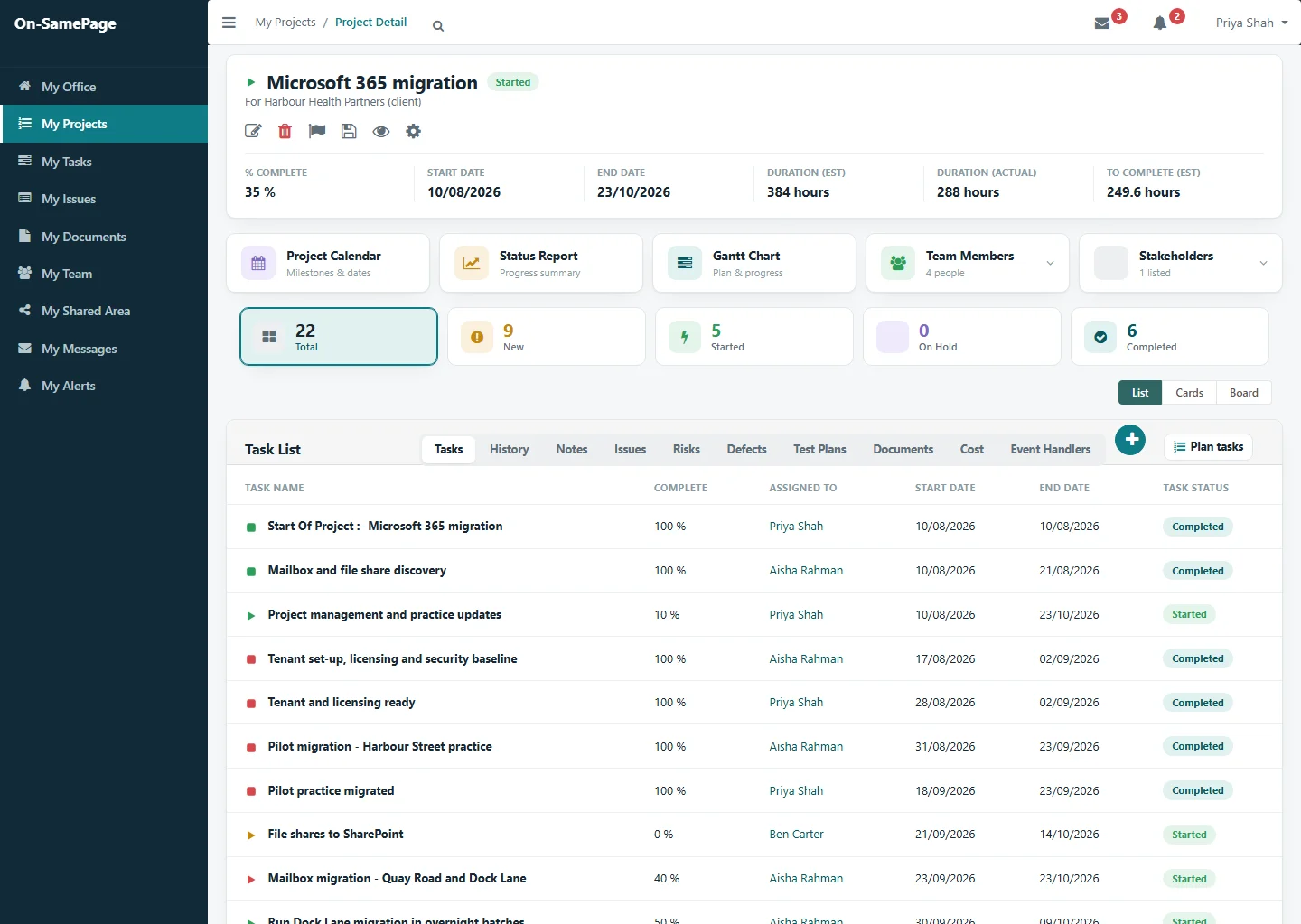
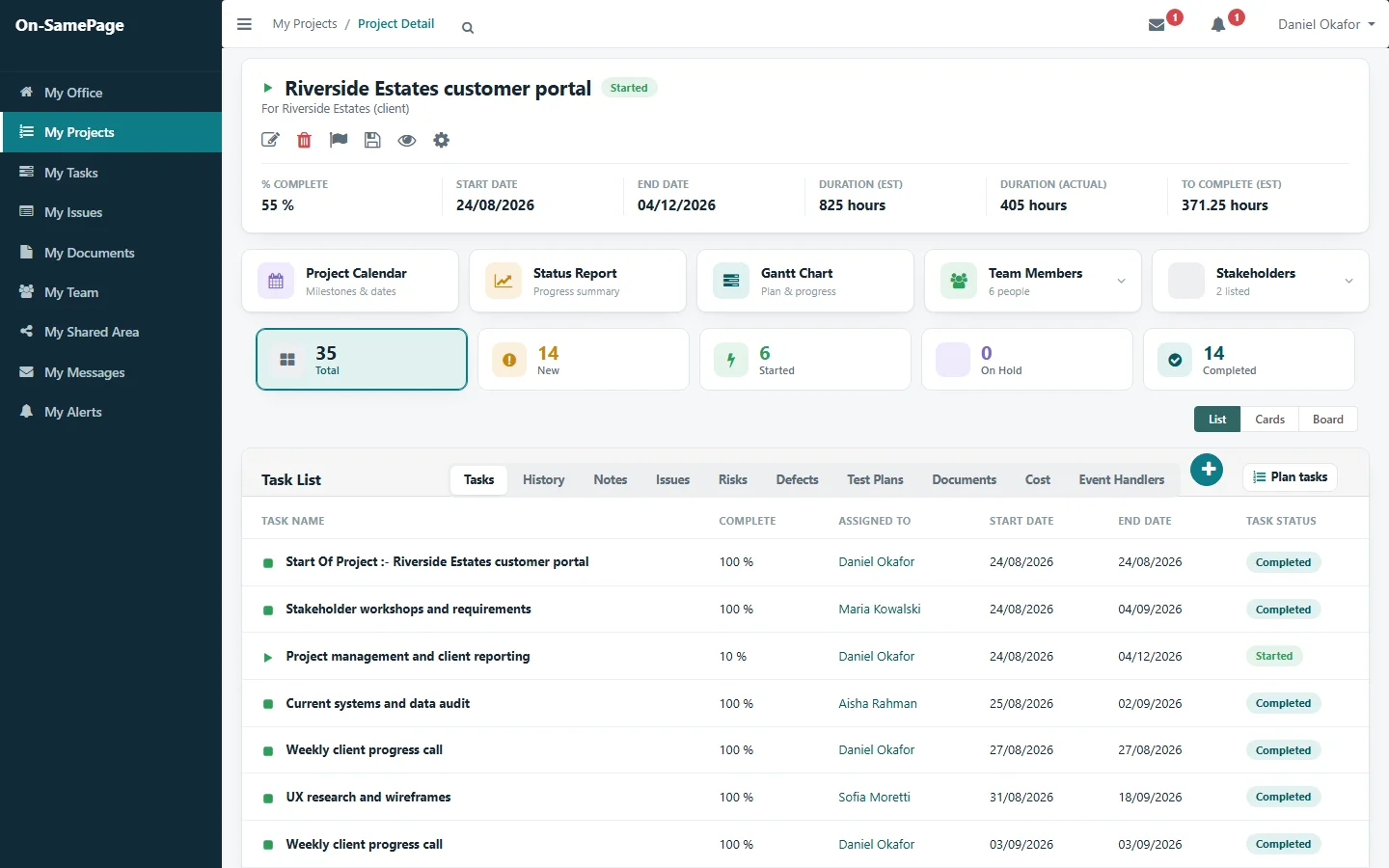
One project: progress, hours and every task
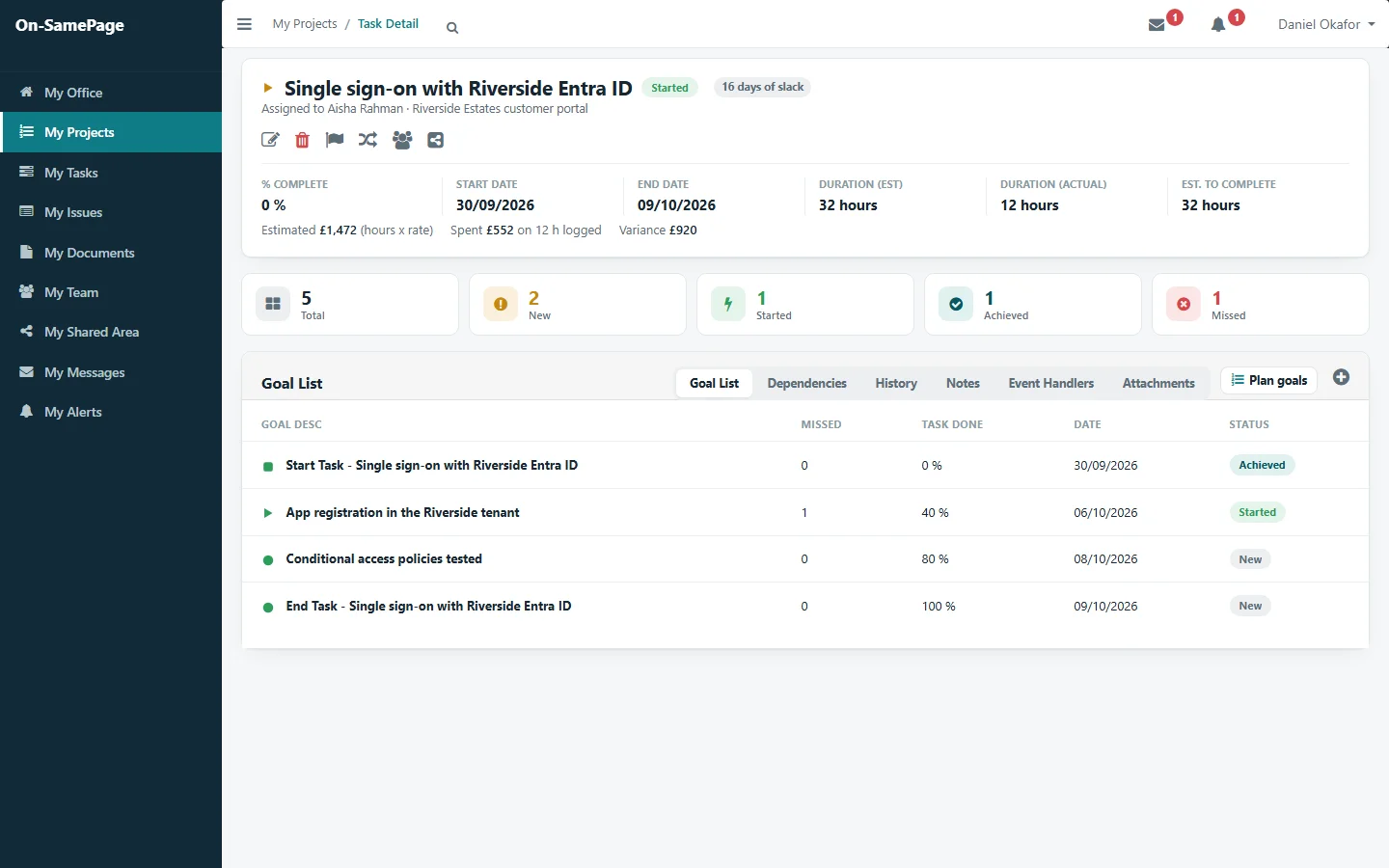
The detail: one task and the plan behind it

Work in views you're already familiar with

Boards, Gantt charts, burndown charts, calendars and dashboards show the work as it stands now, so nobody has to prepare them before they can be used.

  • Kanban boards
  • Story boards
  • Gantt charts
  • Burndown and velocity
  • Calendars
  • Dashboards
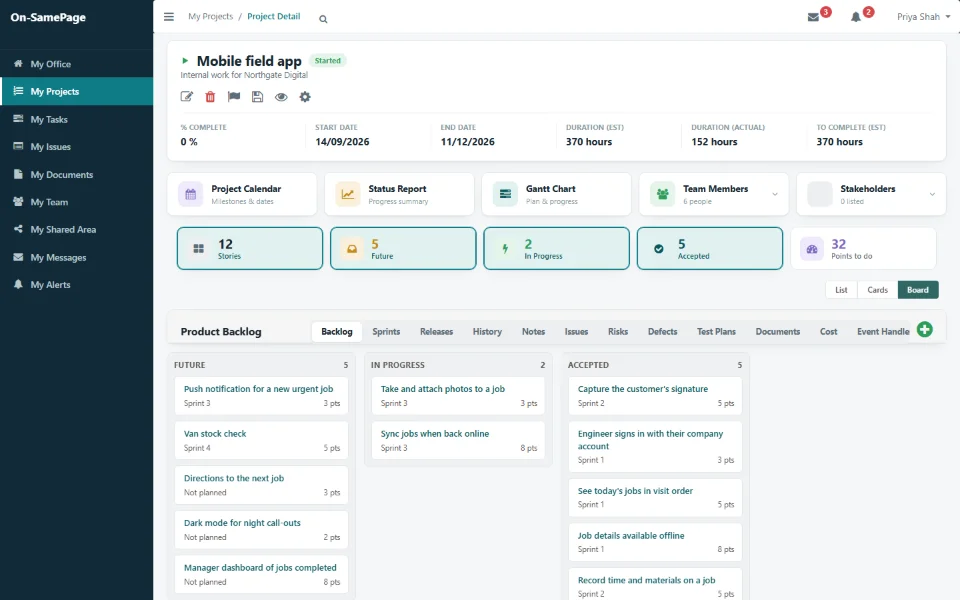
Story board: stories in Future, In Progress and Accepted columns, with sprint and points
Story board
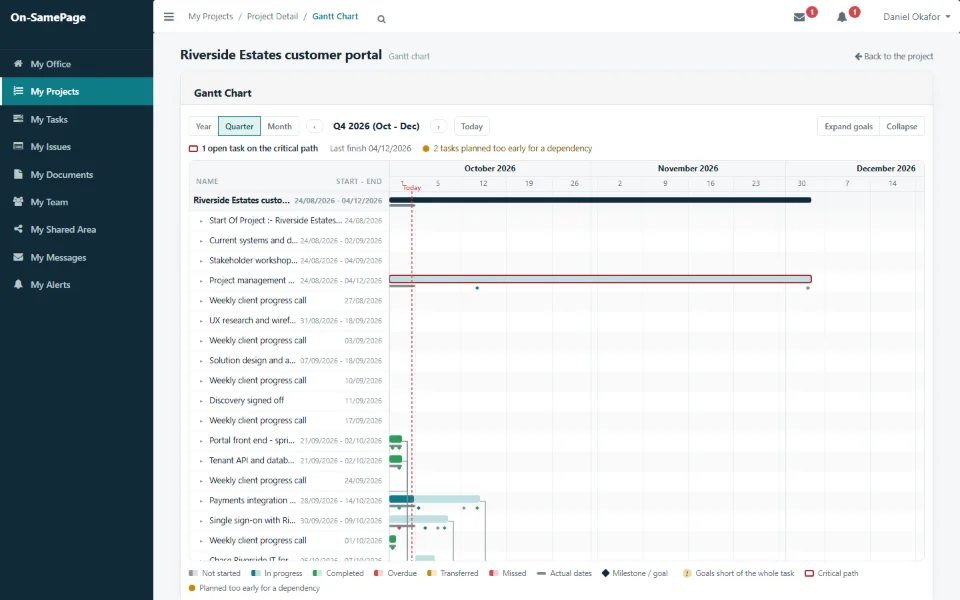
Gantt chart with dependencies, milestones and the critical path
Gantt chart
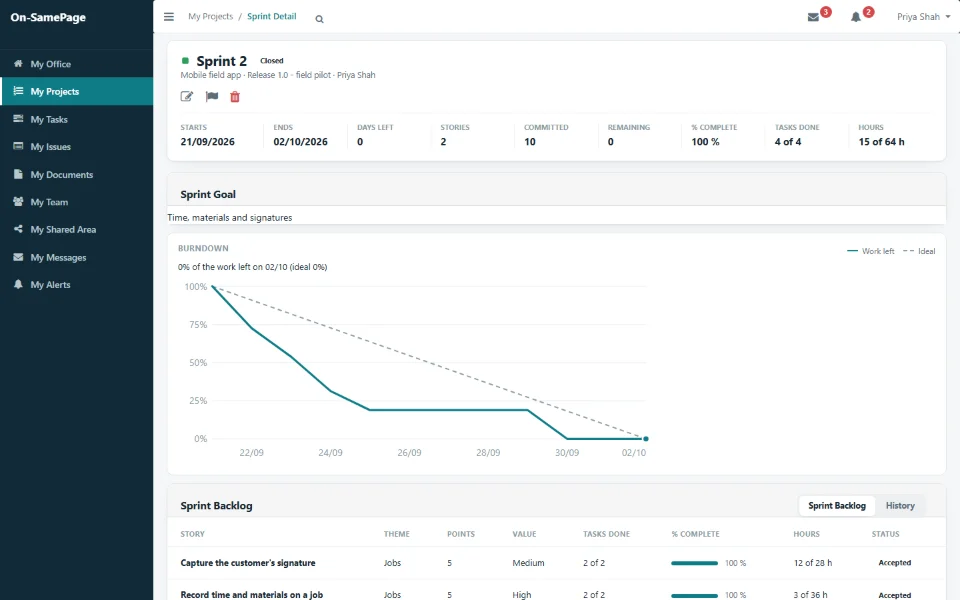
Sprint burndown against the ideal line
Sprint burndown

In practice

Where On-SamePage makes a difference

Day-to-day operations bring challenges that can make it harder to deliver that standard of service. These are the ones On-SamePage helps with.

The screens below come from On-SamePage as implemented for an IT services company, where projects, issues, documents and work knowledge are managed.

Keeping customers

Keep customers informed without constant updates

Customers can see the progress of their own project, what is coming next and anything waiting for their input. They can ask questions, comment and deal with documents waiting for sign-off in the same place.

See it in a demo
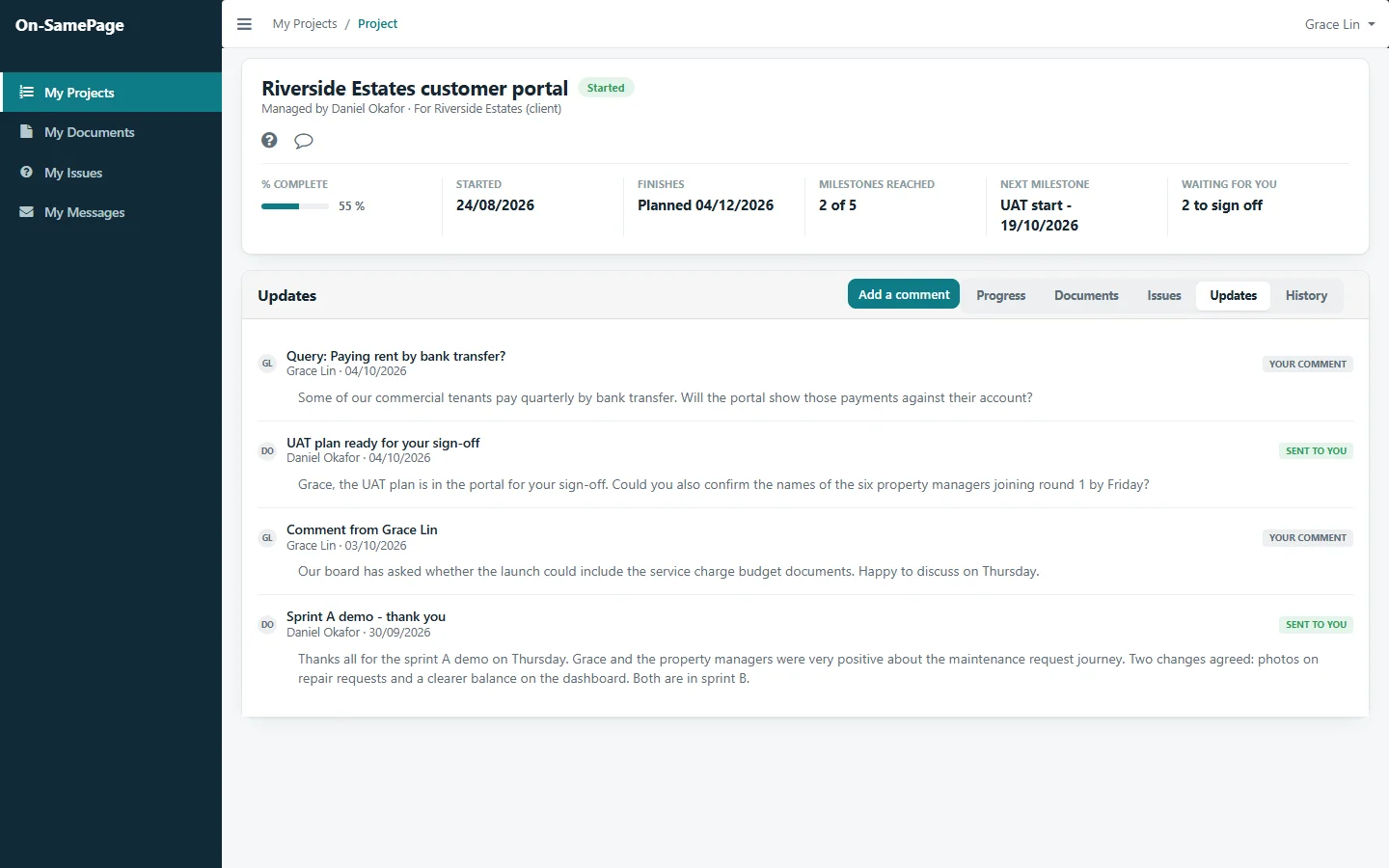
The customer's view of their project: progress, the next milestone, documents to sign off, and the updates exchanged with the team
Delivering consistently

What was promised, and what is being delivered

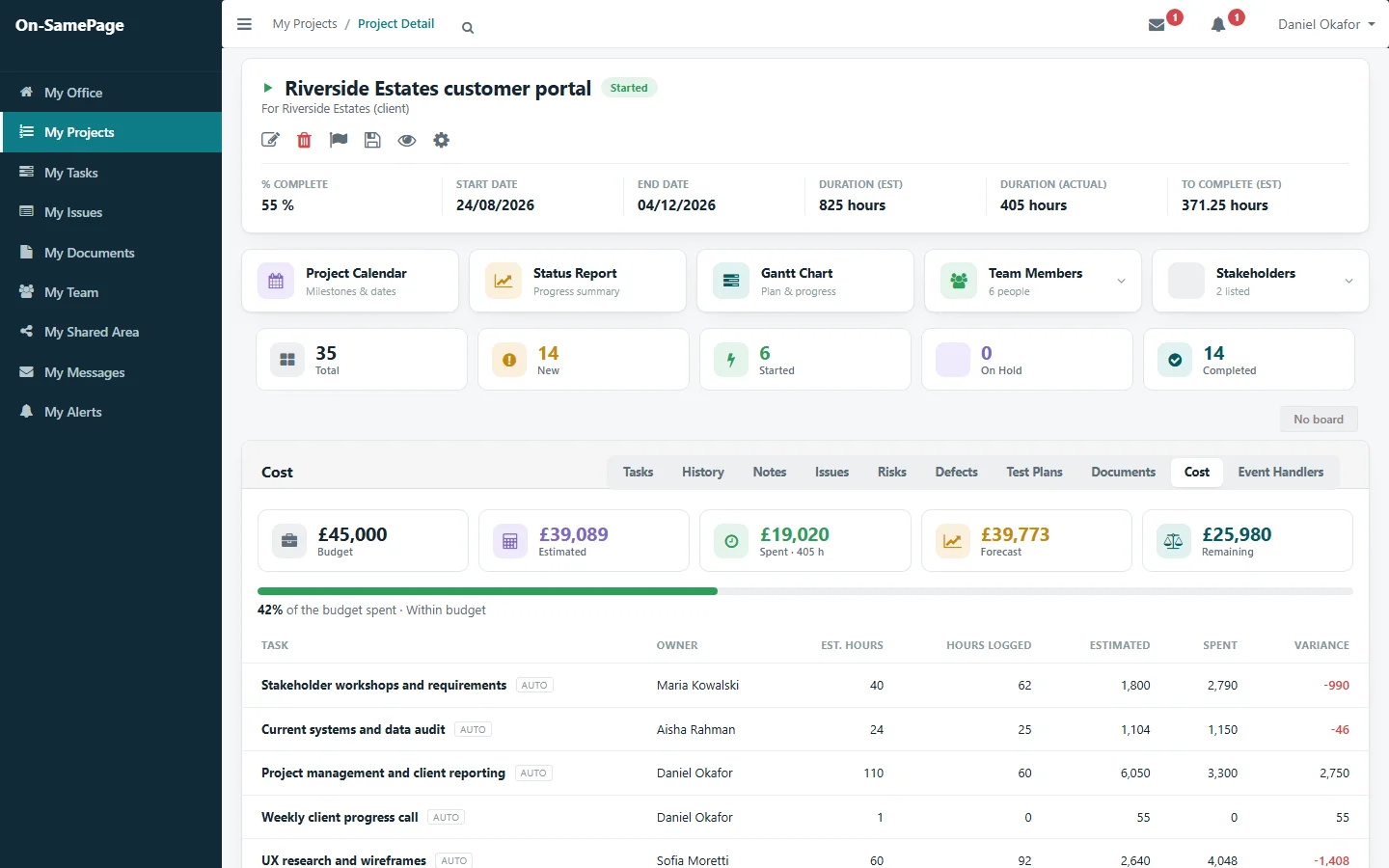
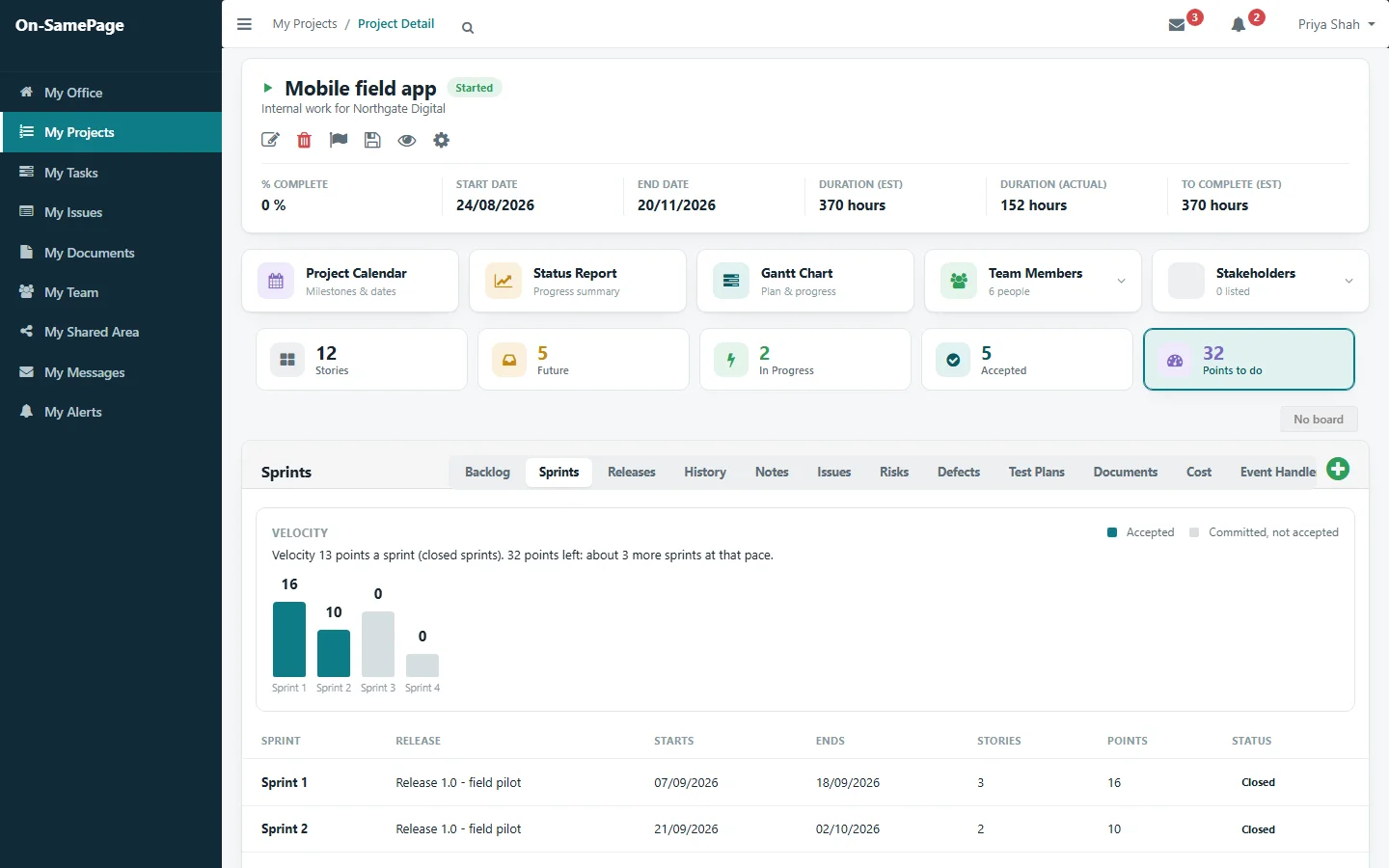
See what has been planned, what has been completed and what is still to do, with each piece of work, who is doing it and where it stands. The project status report is only a click away.

See it in a demo
Project detail with progress, hours and tasksSprints with a velocity chart and a forecast of the sprints remaining
Using resources well

Know who has capacity before assigning more work

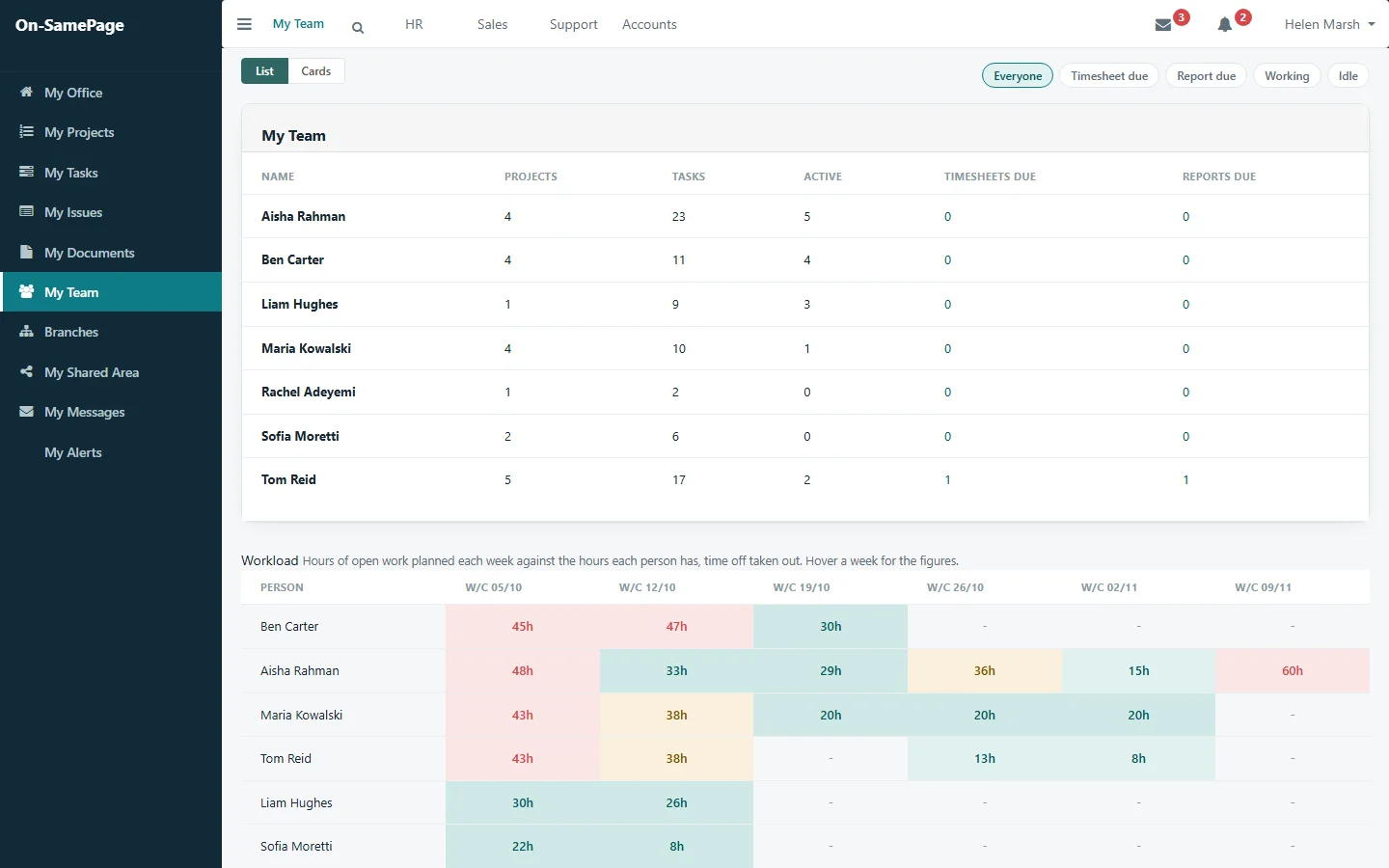
See each person's workload against the time they have available, week by week. Spot who is stretched and who has room before making another commitment.

See it in a demo
Team workload by person and weekProject cost: budget, spent, forecast and remaining, with each task's variance
Spotting problems early
Manage proactively, not reactivelyProblems rarely appear fully formed. They begin as small changes: a task taking longer than expected, a milestone slipping, an issue left unresolved, people becoming stretched. Seeing them early is what lets you act while there is still time.

The plan behind every task

Each task carries the plan its owner set for completing it. Managers see how the work will be done, and spot a missed step while there is still time before the task's deadline.

See it in a demo
A task with its goals, one missed and re-plannedA missed goal with the reason given and its new dateA project where late work is marked
Making sure people have the information they need

The current version, every time

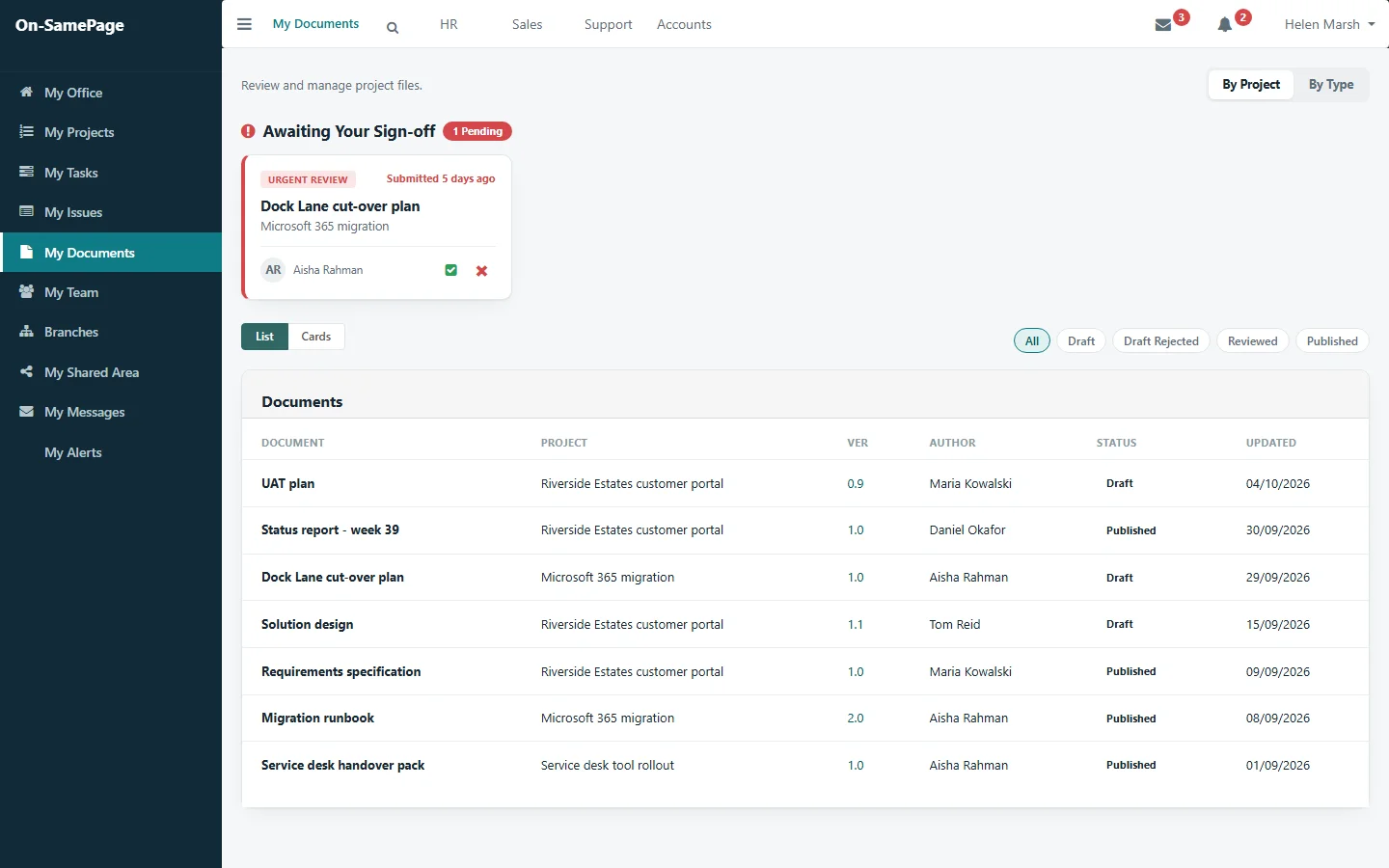
Everyone sees the documents for the projects they work on, with the current version and its status. Anything waiting for their approval appears at the top, ready to review.

See it in a demo
My Documents: a document awaiting sign-off, and every project document with its version and status
A clear picture for decision-making

The whole picture, at a glance

Senior managers shouldn't have to spend hours in meetings or asking for updates to understand how things are going. See every project by status and schedule, what is on track and what needs attention, then drill down into the detail when you need to understand why.

See it in a demo
The manager's overview of every project
Turning everyday work into reports

Open the report instead of preparing it

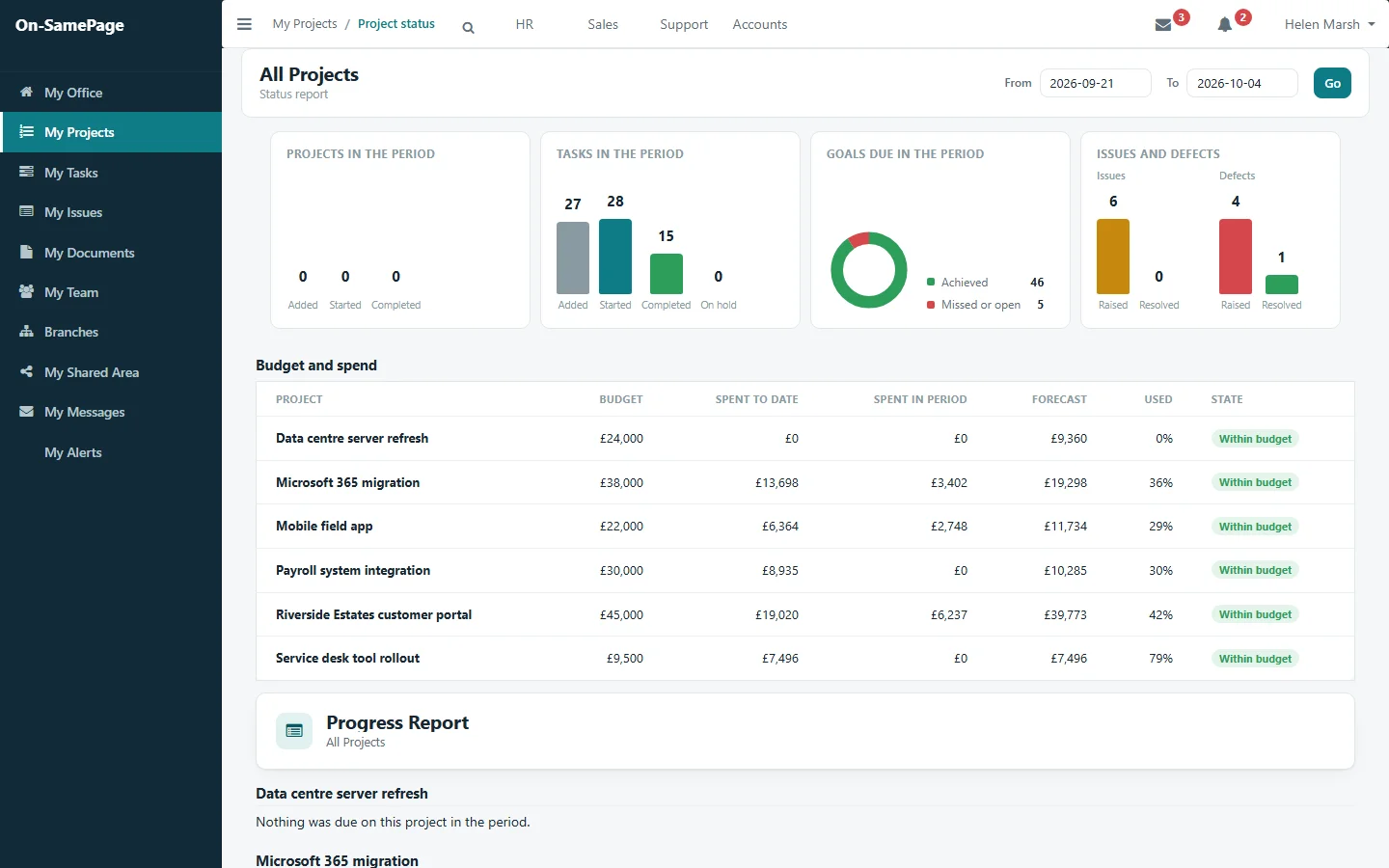
See the status of your projects for any period you choose, including progress, issues, defects, budget and spend. Each report is produced the moment you open it, so nobody has to compile it and nobody is working from a report prepared last week: it reflects what has been recorded up to now, not what was happening when someone last prepared it.

See it in a demo
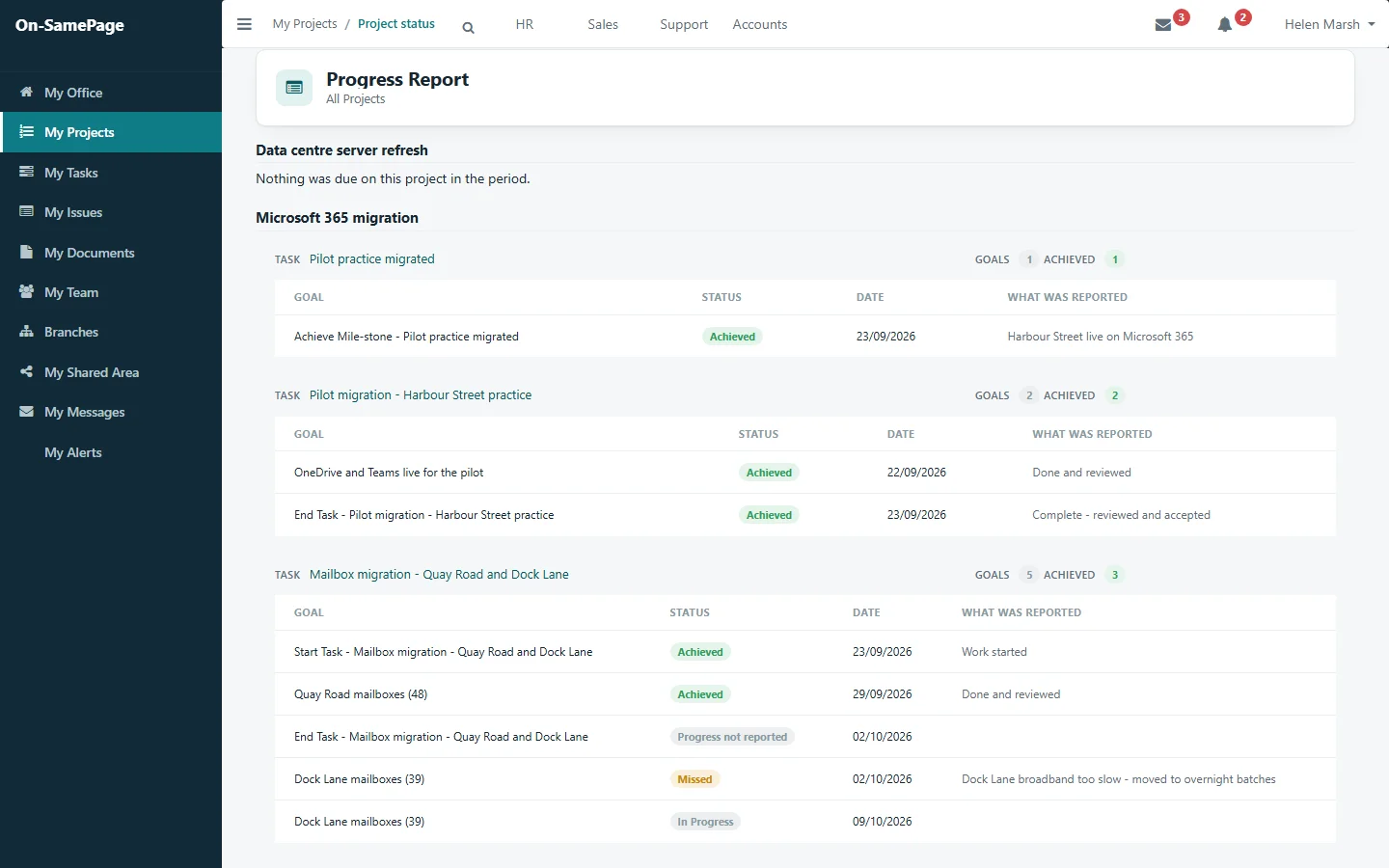
Status report for all projects over two weeks: tasks, goals, issues and defects, with budget, spend and forecastProgress report for all projects: each step due in the period, whether it was achieved, and what was reported

A platform, not a fixed application

Your organisation doesn't work exactly like anyone else's

On-SamePage is a platform, not a shrink-wrapped application that every customer uses in the same form. It can be used to manage projects, issues, risks, documents and much more. Every organisation has its own roles, processes, terminology and ways of working, and On-SamePage is shaped around yours, so people see the information that matters to their responsibilities, while management gets the broader picture it needs. What you have seen here is one example of what can be built on the platform. Another organisation may need something quite different, without starting again from scratch.

Book a demo

Common questions

Before you get in touch

Short answers here. We will go through each one with you in detail.

Is On-SamePage a project management system?

No. On-SamePage is a workplace information sharing and collaboration platform. It can be used to manage projects, issues, risks, documents and much more, and most of these are part of the implementation shown on this page. It connects the information generated through everyday work and puts it in front of the people who need it. What you see here is an example, not a limit.

How is On-SamePage provided?

As a subscription, hosted for you, or bought outright and run on your own servers. Both include implementation, which shapes On-SamePage around your organisation.

Can it be shaped to how we work?

Yes. Each implementation is built around your organisation's roles, processes, terms and reports, and changes as your needs change.

How long does it take to get started?

Implementation starts with one team or one set of projects, and others join when they are ready. How long it takes depends on how much tailoring your organisation needs; we will tell you after a short discovery.

Does it replace the tools we use now?

It brings projects, tasks, plans, issues, risks, documents, time, cost and customer updates together in one place, so it can take the place of the separate tools and spreadsheets used for those. It has no public interface for other systems to connect to, by design, which keeps your information in one secure place.

Where is it hosted, and who owns the data?

If you subscribe, on servers in the UK, backed up daily, with your organisation's data in its own database. If you buy On-SamePage outright, it runs on your own servers. Either way the data is yours: a subscriber who later buys the platform takes the database with them.

Who we are

Built by people who have delivered the work

On-SamePage was born in 2005, from the problems our CEO and founder had faced, and seen colleagues struggle with, over 25 years in IT as a programmer, team leader and project manager: the time lost to chasing updates, sitting in status meetings and looking for the latest information.

It is built by Workplace Software Solutions Limited, a UK company that has been building business software since 2008, and the makers of Bizheart.

What could your people do with the time they get back?

If your teams spend hours every week preparing reports, chasing updates, sitting in status meetings or looking for information, let us show you what On-SamePage could look like in your organisation.

Book a demo. A 30-minute walkthrough of On-SamePage running for an IT services company: the dashboards, the reports and the customer's view. Then we talk about what yours would look like.

We use your details only to arrange your demo and reply to your enquiry. We do not share them.